


Routin Smart Route Planner
4.7437.00 Reviews
App Specs
- Version
- 6.1.7
- Updated On
- License
- Free
- Downloads
- 1,000,000+
- Developer
- Routin Inc
- Categories
- Maps & Navigation
- Platform
- Android
Screenshots
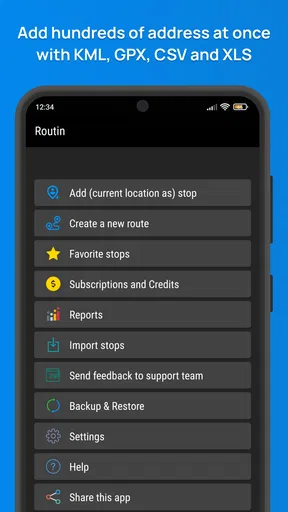
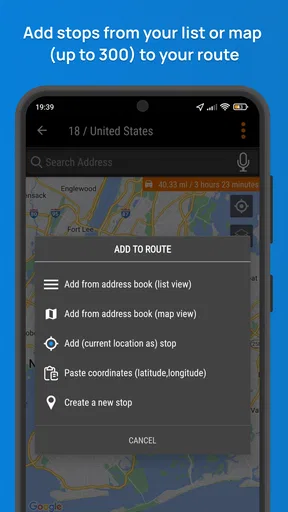
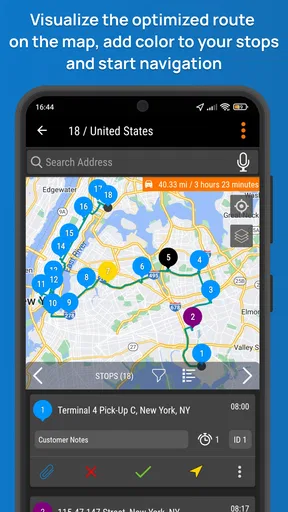
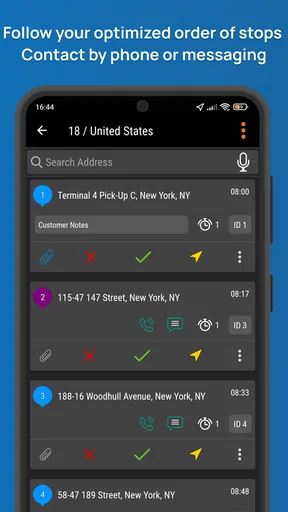
 Analysis by AppCompare
Planning several stops can turn a simple day out into a string of backtracking and last-minute decisions. I like the idea behind Routin Smart Route Planner: put the destinations in one place, then work out a sensible order before setting off. It is a maps and navigation app from Routin Inc, and its focus is narrower than a general-purpose map: helping you organize a trip with multiple stops. That focus is useful, but it also means it works best when you know what kind of help you need from it.
Getting Started with Routin Smart Route Planner
Getting started is straightforward: install the app, create a route, and add the places you need to visit. The interface is intended to keep the route-planning task in view rather than surround it with unrelated tools. The app is free to download, with in-app purchases ranging from $2.99 to $11.99 per item. It is rated for Everyone, and the current version is 5.1.5, with Android support beginning at version 8.0. Its average rating is 4.7 from around 25,000 ratings, and it has over 1 million installs.
Where Route Planning Can Feel Tricky
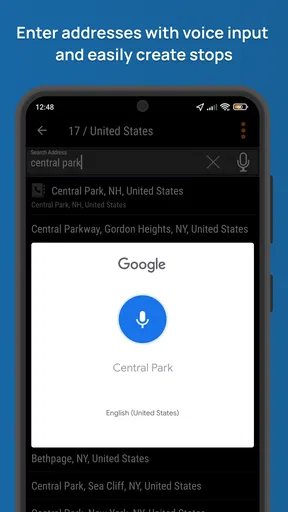
The part that deserves the most care is entering the stops. Route planning depends on the places being recognized correctly, so I would check each result before moving on, especially when two businesses have similar names or an address belongs to a large complex. A route can only be as useful as its destination list. Taking a moment to verify locations at the start is less frustrating than discovering a mismatch while already on the road.
It also helps to separate planning from navigation in your mind. A multi-stop planner is for arranging the sequence of visits; a familiar map app may still be the better choice when you need to inspect a place, check local details, or follow turn-by-turn directions in a way you already know. I would treat Routin as the planning desk for the day, not assume that every part of a journey has to happen inside one screen.
Small Setup Checks That Save Time
Before building a complicated route, I’d try a short one with a couple of familiar destinations. That gives you a low-pressure way to learn how adding stops feels and whether the suggested order makes sense for your own plans. If a location looks wrong, edit or replace it before adding more stops; a tidy list is easier to review than a long route with one uncertain entry buried in it.
Think about the order constraints, too. The shortest-looking sequence may not match your day if you have an appointment at a fixed time, need to collect something before a shop closes, or want to finish near home. I would note those priorities first, then use the planner to help with the flexible stops. This is a practical trade-off: route optimization can reduce needless travel, but it cannot know which errand matters most unless you account for that yourself.
Features That Make It Stand Out
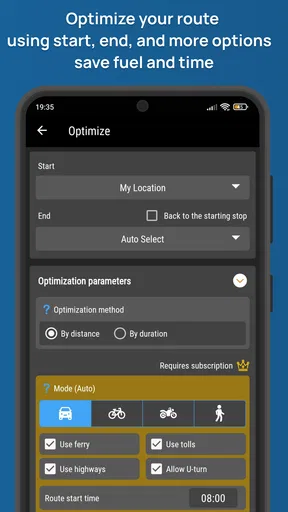
One of the standout features is the ability to input multiple destinations at once. You just punch in your stops, and voilà, the app calculates the most efficient route for you. It’s like having a GPS on steroids. The craziest part? It updates in real-time. So, if there’s a sudden road closure or traffic jam, Routin recalibrates faster than you can say "detour."
Worth Reading Before You Choose

EA SPORTS FC Mobile 26 Is a Bigger Football Game, but It Takes Time

Flipboard Shows What News Apps Must Do Beyond the Feed

Switching to Android Auto Means Rethinking Your Driving Routine

Google Calendar Makes a Crowded Week Easier to Manage

Ludo King Makes the Most of the Minutes Between Plans

Baby Panda World Brings Quick Play to Modern Phones, but Its Game Library Feels Busy
Another neat feature is the estimated time of arrival (ETA) notifications. It’s a lifesaver for those days when you’re running late. The app will send you reminders and give you a heads-up if your schedule starts to slip. Plus, it syncs beautifully with calendar apps, so you can keep everything in one place. No more flipping between a million apps to figure out your day!
A Route That Fits a Real Day
Imagine a weekday with a parcel to collect, groceries to pick up, and a short meeting across town. I would add the locations before leaving, then check the order against the meeting time rather than blindly accepting any sequence. If the meeting is fixed, it becomes the anchor; the other errands can fit around it. That simple habit makes a route plan more realistic than treating every stop as equally flexible.
For delivery drivers, sales representatives, and anyone who visits several addresses in one shift, the value is less about a single clever route and more about reducing repeated planning. Routin is aimed at this kind of multi-stop day, and the app’s 1 million-plus installs suggest it has found an audience among people who want that focused task handled on a phone. For occasional errands, it can still help, though manually entering stops may feel like extra work if you only have one or two destinations.
When to Use Another Map App Alongside It
Compared with using a general navigation app alone, Routin’s appeal is the emphasis on organizing several destinations as one planning job. A standard map is often more convenient for a single trip or for exploring a place while you travel. If your day has many stops, planning their sequence first can be more useful than repeatedly entering the next address after each visit. I see these approaches as complementary rather than competing: use a multi-stop planner to think through the day, and use the navigation tool you trust for the parts where you need detailed guidance.
There is a limit to what any route planner can decide for you. A calculated sequence may not account for a personal preference, a promised pickup time, or the fact that you want to avoid arriving somewhere too early. Review the plan before starting, and adjust it to fit the real schedule. This is especially worthwhile when a missed appointment would matter more than a little extra driving.
Practical Use Cases
So, how’s this app in real-world scenarios? Well, I decided to test it during a particularly busy Saturday. I had to hit the grocery store, drop off dry cleaning, and meet a friend for coffee—all within a tight timeframe. With Routin, I managed to squeeze in all my errands and even had time to grab a quick bite. The app’s precision in plotting routes saved me a ton of time.
For professionals like delivery drivers or sales reps, Routin can be a game-changer. Imagine being able to optimize your daily routes and cut down on travel time. The app even allows you to save frequent routes, making your daily grind much smoother.
Recovering When Plans Change
Plans rarely stay fixed for a full day. If a stop becomes unnecessary, I would remove it from the plan rather than keep mentally working around it. If a new destination comes up, check its location and then reconsider the sequence; simply adding it at the end may create avoidable backtracking. Keeping the list current is a small but useful workflow habit, particularly when several people or appointments shape the day.
If the route seems off, start with basic checks: confirm the destination entry, review the stop order, and make sure the plan still reflects what you intend to do. Then consider whether the issue is the route itself or a change in conditions on the road. A detour, traffic, or a time-sensitive stop can make a once-reasonable plan feel wrong. Reassessing the priorities is often more useful than rebuilding everything from scratch.
Design and Usability
Now, let’s talk about design. The interface is user-friendly, with a sleek, modern look. The color scheme is easy on the eyes, and the icons are self-explanatory. Even if you’re not tech-savvy, you’ll find it easy to navigate. One small gripe, though, is that it could benefit from a dark mode option for those late-night drives.
Usability-wise, Routin is all about simplicity. The app doesn’t bombard you with ads or push notifications—just the essentials to keep you on track. It’s refreshing to use something that’s both straightforward and efficient.
When the App May Not Be the Problem
A route that does not match expectations is not automatically a software failure. The address may point to a broad location, a road situation may have changed, or your schedule may impose a priority the app cannot infer. I would compare the planned sequence with the actual needs of the day before deciding the tool has let me down. For a single destination, a conventional map may simply be quicker; for a complex day, careful stop entry and a quick review matter more.
Routin is also not the right fit for someone who rarely has more than one place to visit and prefers to search as they go. Its main strength is planning multiple stops, so users looking for a general-purpose map, local discovery, or a replacement for every navigation habit may be better served by their usual mapping app. On the other hand, people who repeatedly visit several addresses can benefit from having a dedicated route-planning step.
Final Thoughts
All in all, Routin Smart Route Planner is an impressive tool for anyone looking to streamline their daily travels. Whether you’re juggling a packed schedule or just trying to avoid traffic snarls, this app has got your back. Sure, it’s not perfect—like I mentioned, a dark mode would be a welcome addition—but its benefits far outweigh any minor quibbles.
Ready to give it a whirl? Check out the app on your device’s store and see how it can transform your daily routine. Trust me, once you experience the convenience of optimized routes, you’ll wonder how you ever managed without it!
My practical advice is to start with a route you already understand, check every destination, and use the result as a plan rather than an unquestionable instruction. That lets you judge whether its multi-stop approach suits your routine before relying on it for a time-sensitive day. If you regularly coordinate errands or visits across several places, I think Routin is worth trying; if your trips are usually one stop at a time, a general map may be simpler.
Pros
- Efficiently optimizes multi-stop routes.
- User-friendly interface with intuitive navigation.
- Supports offline usage for remote areas.
- Customizable settings for personalized routes.
- Integrates seamlessly with calendar apps.
Cons
- Limited to major cities for detailed mapping.
- Occasional inaccuracies in traffic predictions.
- Some features require a premium subscription.
- Initial setup can be time-consuming.
- Notifications can be overly frequent.
FAQs for Routin Smart Route Planner
What is Routin Smart Route Planner and how does it work?
Routin Smart Route Planner is a navigation app designed to optimize your travel routes, whether you're making deliveries or planning a road trip. The app uses advanced algorithms to calculate the fastest and most efficient path between multiple destinations. By inputting your stops, Routin provides real-time updates and alternative routes to avoid traffic and save time.
Is Routin Smart Route Planner available for both Android and iOS?
Yes, Routin Smart Route Planner is available for both Android and iOS devices. You can download it from the Google Play Store or the Apple App Store. The app is regularly updated to ensure compatibility with the latest operating systems and devices, providing a seamless user experience across platforms.
Does Routin Smart Route Planner require an internet connection?
While Routin Smart Route Planner functions best with an internet connection for real-time traffic updates and route optimization, it also offers offline capabilities. Users can download maps and save routes for offline use, ensuring navigation is possible even in areas with weak or no internet coverage.
Are there any subscription fees or in-app purchases in Routin Smart Route Planner?
Routin Smart Route Planner offers a free version with basic features. For advanced functionalities, such as unlimited stops and premium route optimization, users can opt for a subscription plan. The app provides various in-app purchases to enhance the user experience, and details are available on the app's download page.
How does Routin Smart Route Planner handle privacy and data security?
Routin Smart Route Planner prioritizes user privacy and data security. The app collects minimal data necessary for route planning and does not share personal information with third parties without consent. It employs encryption and other security measures to protect user data, adhering to industry standards and privacy regulations.


